

Concept and Brainstorming
Team Members:
Art/Scrum- Khila Sanchez
Art/Design - James Russo
Programming - Paulo Tassi
Project Lead - Taylor Joslin
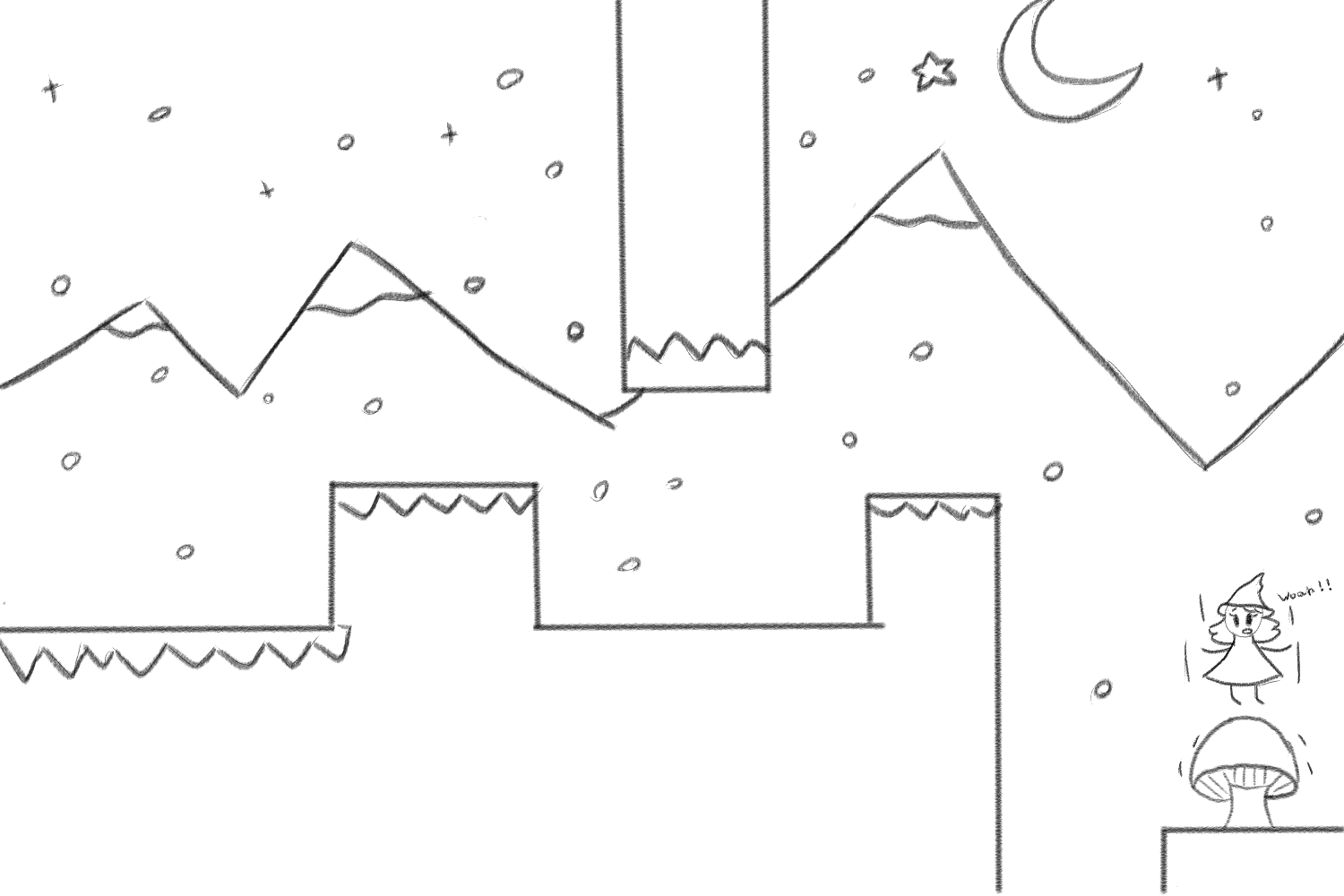
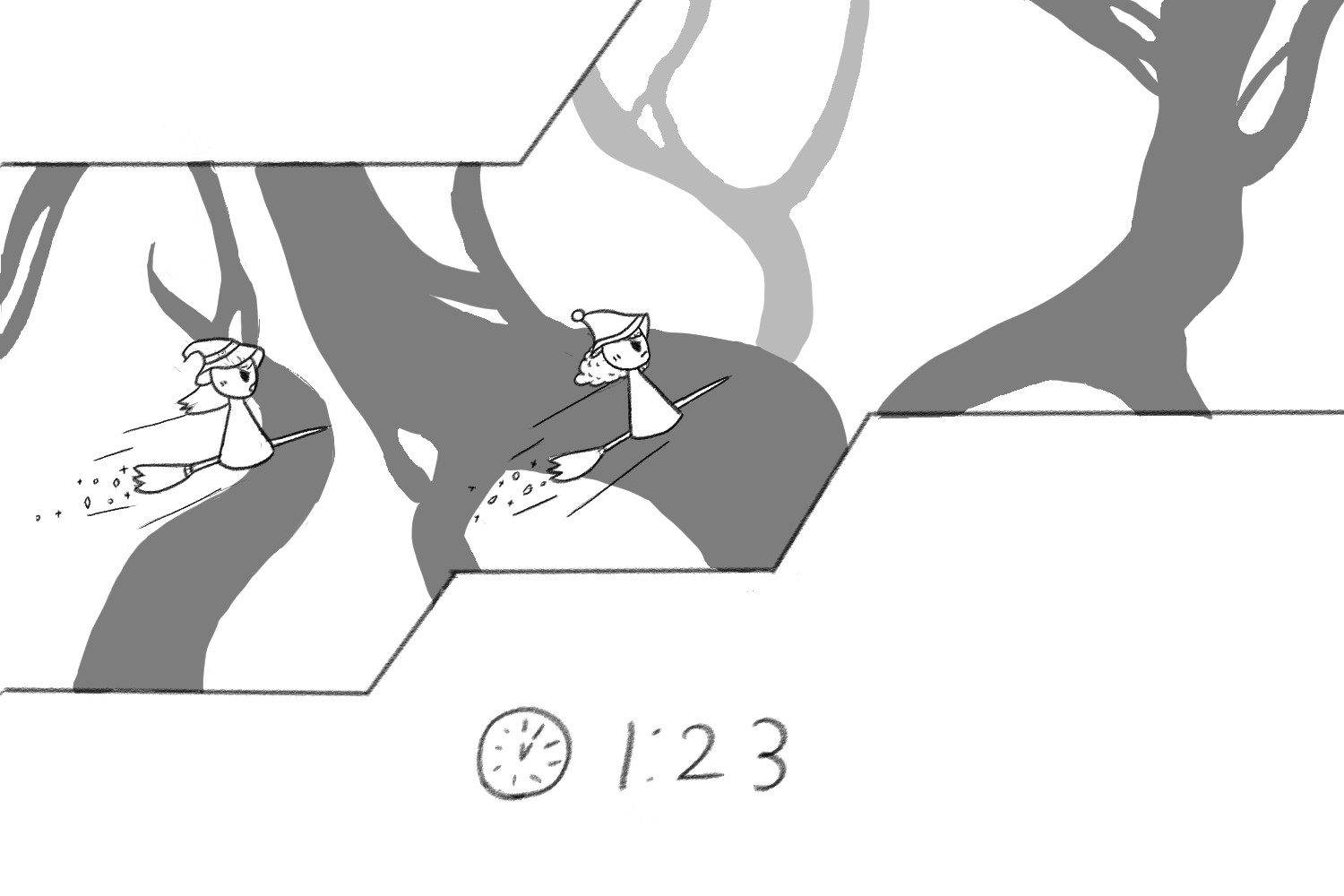
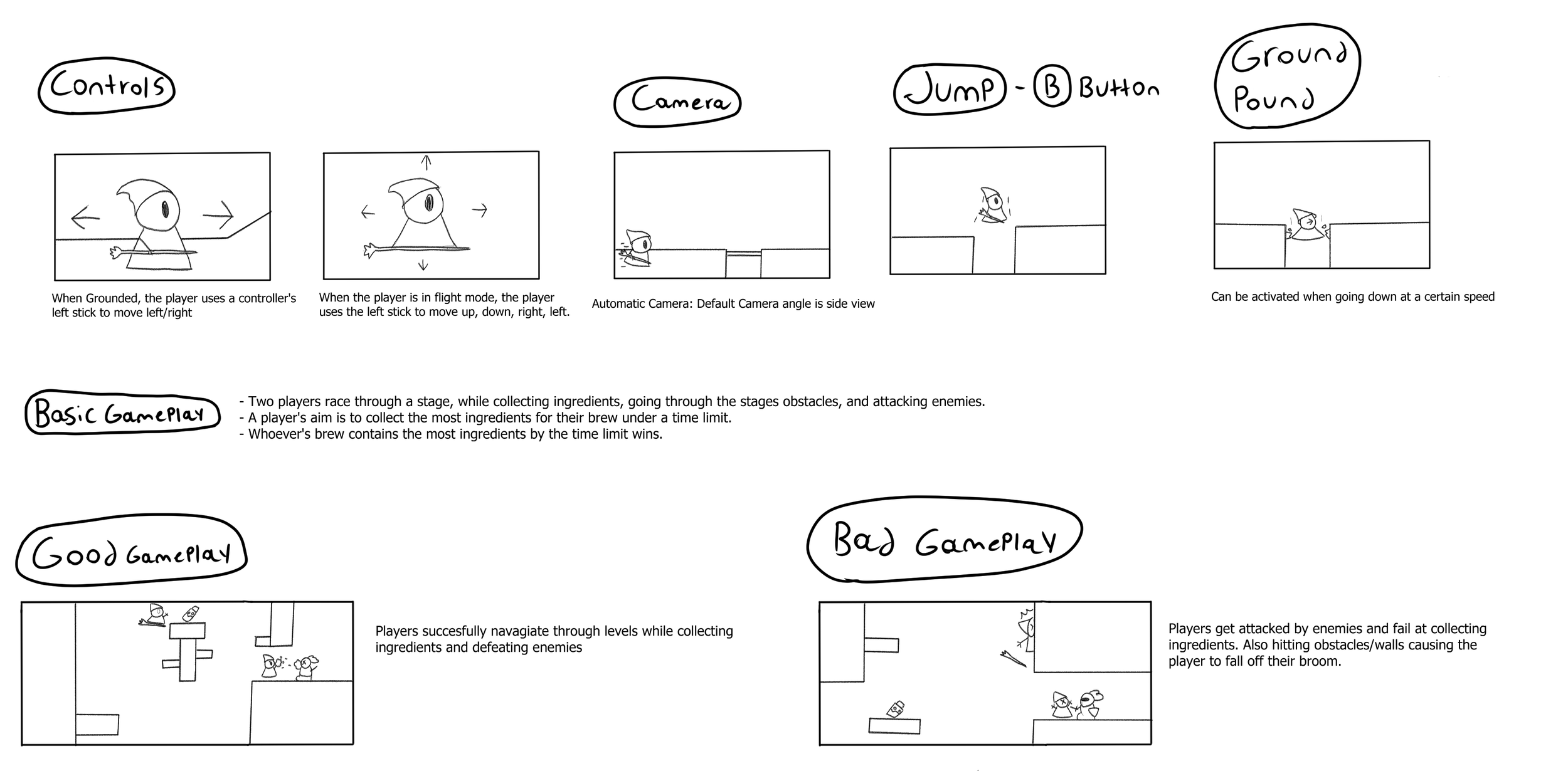
Overview: The objective for the players is to race as fast as they can to the end of the level while collecting ingredients, solving puzzles, and battling enemies along the way.
Game Pillars: Fast Paced Sidescroller | Being a Witch (Witch Spells that can Help/Hurt in a chaotic way) | Competitive/Betrayal (The Evolution of Trust The Evolution of Trust (ncase.me))
Game Concept: The witch business is a competitive one, and you need to be the one with the best brews. Race against other witches to gather ingredients and bring them to your pot. Whoever’s brew contains more ingredients by the time limit wins, but watch out! Your opponents may try to curse you along the way.
Defining and Prototyping
Initial Player Movement
Left and Right movement
Jump
Fall
Omni Directional Flight
Had a “Take-Off” Feature
Version1 of Flight · paulotassi/410Final2024FA@472cd9d · GitHub
Update PlayerController.cs · paulotassi/410Final2024FA@7555c9c · GitHub
using Cinemachine;
using UnityEngine;
using UnityEngine.U2D.Animation; // For sprite animation, unused in this script but necessary for Player Animation

public class PlayerController : MonoBehaviour
{
    // Player movement variables
    public float initialMoveSpeed = 1f; // Initial movement speed before any acceleration
    public float moveSpeed = 5f; // Current movement speed (changes with input)
    public float moveHorizontalFlightSpeed = 1f; // Speed when moving horizontally during flight
    public float flightSpeed = 1f; // Vertical flight speed
    public float topSpeed = 100f; // Maximum allowed speed
    public float jumpForce = 10f; // Force applied when jumping
    public float transitionThreshold = 50f; // Speed threshold for flight mode transition
    public float gravityChangeRate = 0.1f; // Rate at which gravity changes when transitioning between flight and grounded states

    // Ground check variables
    public Transform groundCheck; // Point used to detect if the player is grounded
    public LayerMask groundLayer; // Layer that represents the ground
    public float groundCheckRadius = 0.2f; // Radius of the overlap circle for ground detection
    public Vector3 groundCheckYOffset; // Offset for ground check position

    // Internal state variables
    private Rigidbody2D rb; // Reference to the player's Rigidbody2D component
    public bool isGrounded; // Whether the player is currently grounded
    public float horizontalInput; // Horizontal input from the player
    public float verticalInput; // Vertical input from the player (used in flight mode)
    public bool flightMode = false; // Tracks if the player is in flight mode

    // Animation variables
    public Animator animator; // Reference to the Animator for controlling animations

    //PlayerCam Switch
    public CinemachineVirtualCamera virtualCameraLeft;
    public CinemachineVirtualCamera virtualCameraRight;

    // Start is called before the first frame update
    void Start()
    {
        // Get components on start
        rb = GetComponent(); // Retrieve Rigidbody2D component for physics
        animator = GetComponent(); // Retrieve Animator component for animations
    }

    // Update is called once per frame
    void Update()
    {
        // Capture player input for horizontal (A/D, Left/Right arrows) and vertical (W/S, Up/Down arrows) movement
        horizontalInput = Input.GetAxis("Horizontal");
        verticalInput = Input.GetAxis("Vertical");

        // Ground check: checks if the player is touching the ground
        isGrounded = Physics2D.OverlapCircle(groundCheck.position - groundCheckYOffset, groundCheckRadius, groundLayer);

        // Set speed parameter in the animator for movement animations
        animator.SetFloat("Speed", moveSpeed);

        // Flip the sprite based on movement direction (left or right)
        if (horizontalInput < 0)
        {
            GetComponent().flipX = true; // Flip to face left
            virtualCameraLeft.Priority = 10; //Changing Camera Priority to go left of player
            virtualCameraRight.Priority = 9;

        }
        else if (horizontalInput > 0)
        {
            GetComponent().flipX = false; // Flip to face right
            virtualCameraLeft.Priority = 9; //Changing Camera Priority to go right of player
            virtualCameraRight.Priority = 10;
        }

        // Toggle flight animation when airborne
        if (!isGrounded)
        {
            animator.SetBool("FlightMode", true); // Set flight animation when not grounded
        }
        else
        {
            animator.SetBool("FlightMode", false); // Disable flight animation when grounded
        }

        // Handle jumping when spacebar is pressed, but only if grounded
        if (Input.GetButtonDown("Jump") && isGrounded)
        {
            Jump(); // Trigger jump
        }

        // Reset move speed to initial value when no horizontal input
        if (horizontalInput == 0)
        {
            moveSpeed = initialMoveSpeed;
        }

        // Handle flight mode transition based on velocity and gravity scale
        // Reduce gravity when moving fast horizontally, otherwise increase gravity
        if ((Mathf.Abs(rb.velocity.x) >= transitionThreshold) && rb.gravityScale >= 0)
        {
            rb.gravityScale -= gravityChangeRate; // Reduce gravity for smoother flight
        }
        else if ((Mathf.Abs(rb.velocity.x) < transitionThreshold) && rb.gravityScale <= 1)
        {
            rb.gravityScale += gravityChangeRate * Time.deltaTime; // Increase gravity when slowing down
        }

        // Toggle flight mode when gravity scale drops below 0.5
        if (rb.gravityScale <= 0.5f && !isGrounded)
        {
            flightMode = true;

        }
        else
        {
            flightMode = false;
        }
    }

    // FixedUpdate is called at fixed intervals, used for physics-based calculations
    void FixedUpdate()
    {
        // Apply movement every physics frame
        Move();
        // Reset move speed to initial value when no horizontal input
        if (horizontalInput == 0)
        {
            moveSpeed = initialMoveSpeed;
        }
        // Accelerate the player until they reach top speed
        if (moveSpeed <= topSpeed)
        {
            moveSpeed += 0.5f; // Increase speed gradually
        }
        else if (moveSpeed >= topSpeed)
        {
            moveSpeed = topSpeed;//Caps moveSpeed
        }
    }

    // Move the player horizontally or in flight mode
    void Move()
    {

        if (flightMode)
        {
            // In flight mode, move based on both horizontal and vertical input
            rb.velocity = new Vector2(horizontalInput * moveHorizontalFlightSpeed, verticalInput * flightSpeed);
        }
        else
        {
            // On the ground, move only horizontally
            rb.velocity = new Vector2(horizontalInput * moveSpeed, rb.velocity.y);
        }
    }

    // Handle the jump action by applying a vertical force
    void Jump()
    {
        rb.AddForce(new Vector2(rb.velocity.x, jumpForce), ForceMode2D.Impulse); // Apply jump force
    }

    // Visualize the ground check area in the editor (helpful for debugging)
    void OnDrawGizmosSelected()
    {
        if (groundCheck != null)
        {
            Gizmos.color = Color.red; // Set color of the Gizmo to red
            Gizmos.DrawWireSphere(groundCheck.position - groundCheckYOffset, groundCheckRadius); // Draw the ground check sphere
        }
    }
Defining and Prototyping
Interactable Prototype
Base Class created for Collectable Objects
Ingredient Class inheritance
Allowed for future expansion of objects
Game Managers, and Gamification Added
using System.Collections;
using System.Collections.Generic;
using UnityEngine;

public class Ingredient : collectableObject
{
    public GameManager Manager;

    public void Start()
    {
        Manager = FindFirstObjectByType();
    }
    public override void Player1CollectItem()
    {
        base.Player1CollectItem();
        Manager.player1IncreaseIngredient();
    }

    public override void Player2CollectItem()
    {
        base.Player2CollectItem();
        Manager.player2IncreaseIngredient();
    }
}
Post MVP Changes (Initial)
Player Changes
Implemented new Input System
Added Player Aim for both Controller and Mouse and Keyboard
Player Attack Rotation early implementation
using System.Collections;
using System.Collections.Generic;
using UnityEngine;
using UnityEngine.InputSystem; // Required for using the Input System

public class PlayerAttack : MonoBehaviour
{
    // Public variables accessible from the Unity Editor
    public Camera mainCam; // Main Camera reference to get mouse position in the world space
    public float horizontalAimInput; // Horizontal aim input value (-1 to 1)
    public float verticalAimInput; // Vertical aim input value (-1 to 1)
    public Vector3 targetPos; // Position on the screen where the player is aiming
    public PlayerController controller; // Reference to the PlayerController script to get input values

    // Function to remap a value from one range to another
    // Example: Remaps a value from [-1, 1] to [-250, 1500] or [-300, 500]
    float Remap(float value, float fromMin, float fromMax, float toMin, float toMax)
    {
        // The formula scales the input range to the output range proportionally
        return (value - fromMin) / (fromMax - fromMin) * (toMax - toMin) + toMin;
    }

    // Called every frame
    void Update()
    {
        // Get horizontal and vertical aim input from the controller (e.g., joystick or mouse input)
        horizontalAimInput = controller.aimInput.x; // X-axis aim input, range [-1, 1]
        verticalAimInput = controller.aimInput.y; // Y-axis aim input, range [-1, 1]

        // Remap the input from [-1, 1] to new custom ranges for different input axes
        float horizontalAimInput2 = Remap(horizontalAimInput, -1f, 1f, -250f, 1500f);
        float verticalAimInput2 = Remap(verticalAimInput, -1f, 1f, -300f, 500f);

        // Check if the "K" key is pressed on the keyboard
        if (Input.GetKey(KeyCode.K))
        {
            // Log the currently active control scheme (e.g., "Keyboard&Mouse", "GamePad")
            Debug.Log(controller.GetComponent().currentControlScheme);
        }

        // If the current control scheme is "GamePad", use the remapped values for aiming
        if (controller.GetComponent().currentControlScheme == "GamePad")
        {
            // Set target position using the remapped aim input (for gamepad aiming)
            targetPos = new Vector3(horizontalAimInput2, verticalAimInput2, -10); // -10 for Z-axis (camera depth)
        }
        else
        {
            // For other control schemes (e.g., keyboard and mouse), use the raw input values directly
            targetPos = new Vector3(horizontalAimInput, verticalAimInput, -10); // -10 for Z-axis (camera depth)
        }

        // Convert the screen position (targetPos) into world position using the camera
        // This is useful for determining where the player is aiming in the game world
        Vector3 mousePos = mainCam.ScreenToWorldPoint(targetPos);

        // Calculate the direction from the player's current position to the aim position
        // This helps in determining the angle of rotation based on where the player is aiming
        Vector3 rotation = new Vector3(mousePos.x - transform.position.x, mousePos.y - transform.position.y, transform.position.z);

        // Calculate the angle (in radians) between the player's position and the aim position
        // Then convert that angle to degrees for easier use in Unity (since rotations in Unity are in degrees)
        float rotZ = Mathf.Atan2(rotation.y, rotation.x) * Mathf.Rad2Deg;

        // Rotate the player towards the target position (based on the calculated angle)
        // Quaternion.Euler is used to set the rotation based on the Z-axis angle (rotZ)
        transform.rotation = Quaternion.Euler(0, 0, rotZ);
    }
}
Player Attack Fixes
Player Attack Changes
Added correct quaternion usage to Controller Aim
Used Atan2 instead of remapping for all aim
Added Deadzone for controller
using System.Collections;
using System.Collections.Generic;
using UnityEngine;
using UnityEngine.InputSystem; // Required for using the Input System

public class PlayerAttack : MonoBehaviour
{
    // Public variables accessible from the Unity Editor
    public Camera mainCam; // Main Camera reference to get mouse position in the world space
    public float horizontalAimInput; // Horizontal aim input value (-1 to 1)
    public float verticalAimInput; // Vertical aim input value (-1 to 1)
    public Vector3 targetPos; // Position on the screen where the player is aiming
    public PlayerController controller; // Reference to the PlayerController script to get input values
    public Transform aimObject;
    public float controllerDeadzone = 0.1f;

    // Function to remap a value from one range to another
    // Example: Remaps a value from [-1, 1] to [-250, 1500] or [-300, 500]


    // Called every frame
    void Update()
    {
        // Get horizontal and vertical aim input from the controller (e.g., joystick or mouse input)
        horizontalAimInput = controller.aimInput.x; // X-axis aim input, range [-1, 1]
        verticalAimInput = controller.aimInput.y; // Y-axis aim input, range [-1, 1]

        // If the current control scheme is "GamePad", use the remapped values for aiming
        if (controller.GetComponent().currentControlScheme == "GamePad")
        {
            // Set target position using the remapped aim input (for gamepad aiming)
            if (horizontalAimInput >= controllerDeadzone || verticalAimInput >= controllerDeadzone)
            {
                // Calculate the aim angle in radians and convert it to degrees
                float aimAngle = Mathf.Atan2(verticalAimInput, horizontalAimInput) * Mathf.Rad2Deg;

                // Apply the rotation to the aimObject
                aimObject.rotation = Quaternion.Euler(0, 0, aimAngle);
            }
        }
        else
        {
            // For other control schemes (e.g., keyboard and mouse), use the raw input values directly
            targetPos = new Vector3(horizontalAimInput, verticalAimInput, -10); // -10 for Z-axis (camera depth)

            // Convert the screen position (targetPos) into world position using the camera
            // This is useful for determining where the player is aiming in the game world
            Vector3 mousePos = mainCam.ScreenToWorldPoint(targetPos);

            // Calculate the direction from the player's current position to the aim position
            // This helps in determining the angle of rotation based on where the player is aiming
            Vector3 rotation = new Vector3(mousePos.x - transform.position.x, mousePos.y - transform.position.y, transform.position.z);

            // Calculate the angle (in radians) between the player's position and the aim position
            // Then convert that angle to degrees for easier use in Unity (since rotations in Unity are in degrees)
            float rotZ = Mathf.Atan2(rotation.y, rotation.x) * Mathf.Rad2Deg;

            // Rotate the player towards the target position (based on the calculated angle)
            // Quaternion.Euler is used to set the rotation based on the Z-axis angle (rotZ)

            transform.rotation = Quaternion.Euler(0, 0, rotZ);
        }
    }
}
Modernizing Player
Compilation of Changes over a few months
Added States (Stun/flying/inactive)
Added Buffs(Character Modifiers)
Added abilities (Alt Fire/Shielding)
Tweaked Player feel through feedback
Added Animations
Added screenshake/player input feedback
using System.Collections;
using System.Collections.Generic;
using UnityEngine;
using UnityEngine.InputSystem; // Required for using the Input System

using Cinemachine;
using UnityEngine;
using System.Collections;
using UnityEngine.U2D.Animation; // For sprite animation, unused in this script but necessary for Player Animation
using UnityEngine.InputSystem;
using UnityEngine.SceneManagement;

public class PlayerController : MonoBehaviour
{
    [SerializeField] private enum State { Idle, Walking, Flying }
    private State currentState = State.Idle;

    // Player movement variables
    [Header("Movement Settings" +
        "")]
    public Vector2 movementInput = Vector2.zero; //input vector

    public float initialMoveSpeed = 1f; // Initial movement speed before any acceleration
    public float moveSpeed = 5f; // Current movement speed (changes with input)
    public float moveHorizontalFlightSpeed = 1f; // Speed when moving horizontally during flight
    public float flightSpeed = 1f; // Vertical flight speed
    public float topSpeed = 100f; // Maximum allowed speed
    public float jumpForce = 10f; // Force applied when jumping
    public float transitionThreshold = 50f; // Speed threshold for flight mode transition
    public float liftChangeRate = 0.1f; // Rate at which gravity changes when transitioning between flight and grounded states
    public float fallRate = 3f; // Rate at which gravity changes when transitioning from flight to grounded states
    public float liftForce = 0f;
    public float flightThreshold = 5f;
    public float inactivityTime = 0f; // Time player has been inactive
    public float inactivityThreshold = 2f; // Time threshold for considering inactivity (in seconds)
    private bool isStunned = false;
    public bool stunnable = true;
    public float stunDR = 3.5f;

    //Player Shoot variables
    [Header("Shoot Settings" +
        "")]
    public Vector2 aimInput = Vector2.zero; //input vector
    public bool canShoot = true; //Shooting bool
    public bool canAltShoot = true; //Shooting bool
    public float shootCoolDown; //How long until players can shoot again
    public float altShootCoolDown; //How long until players can shoot again
    public GameObject projectilePrefab; //The projectile prefab holding the motion for projectiles
    public GameObject altProjectilePrefab; //The projectile prefab holding the motion for projectiles
    public GameObject projectileSpawnLocation; //spawnLocation of the rotating familiar
    public GameObject projectileSpawnRotation; //spawn rotation to follow the Familiar direction

    //Player Shield
    [Header("Shield Settings" +
        "")]
    public bool isShielded = false;
    public bool canShield = true;
    public float shieldCooldown;
    public float shieldDuration;

    // Player Actions
    private bool jumped = false;
    public bool fired = false;
    private bool dashed = false;
    public bool shielded = false;
    public bool altFired = false;


    // Ground check variables
    public Transform groundCheck; // Point used to detect if the player is grounded
    public LayerMask groundLayer; // Layer that represents the ground
    public float groundCheckRadius = 0.2f; // Radius of the overlap circle for ground detection
    public Vector3 groundCheckYOffset; // Offset for ground check position

    // Internal state variables
    public Rigidbody2D rb; // Reference to the player's Rigidbody2D component
    public bool isGrounded; // Whether the player is currently grounded
    public float horizontalInput; // Horizontal input from the player
    public float verticalInput; // Vertical input from the player (used in flight mode)
    public bool flightMode = false; // Tracks if the player is in flight mode
    private bool isFalling = false;

    // Animation variables
    public Animator animator; // Reference to the Animator for controlling animations

    //PlayerCam
    [Header("Camera Settings" +
        "")]
    public CinemachineVirtualCamera virtualCameraLeft;
    public CinemachineVirtualCamera virtualCameraRight;
    [SerializeField] protected CinemachineBasicMultiChannelPerlin rightNoise;
    [SerializeField] protected CinemachineBasicMultiChannelPerlin leftNoise;
    [SerializeField] protected float screenShakeValue = 1f;
    [SerializeField] protected float screenShakeDuration = 0.5f;


    // Start is called before the first frame update
    void Start()
    {
        // Get components on start
        rb = GetComponent(); // Retrieve Rigidbody2D component for physics
        animator = GetComponent(); // Retrieve Animator component for animations
        leftNoise = virtualCameraLeft.GetCinemachineComponent();
        rightNoise = virtualCameraRight.GetCinemachineComponent();
    }

    // Update is called once per frame
    void Update()
    {
        // Capture player input
        horizontalInput = movementInput.x;
        verticalInput = movementInput.y;

        // Check if player is grounded
        isGrounded = Physics2D.OverlapCircle(groundCheck.position - groundCheckYOffset, groundCheckRadius, groundLayer);

        // Update animator parameters
        animator.SetFloat("WalkSpeed", moveSpeed);
        animator.SetFloat("FlightY", verticalInput);
        animator.SetBool("Flying", flightMode);
        animator.SetBool("Falling", isFalling);
        animator.SetBool("Grounded", isGrounded);

        // Handle sprite flipping and camera priority
        HandleSpriteFlipAndCamera();

        // Handle player actions
        if (jumped && isGrounded && !isStunned) Jump();
        if (fired && canShoot && !isStunned) StartCoroutine(Shoot());
        if (altFired && canAltShoot && !isStunned) StartCoroutine(AltShoot());
        if (shielded && canShield && !isStunned) StartCoroutine(Shield());

        // Reset move speed if no horizontal input
        moveSpeed = (horizontalInput == 0) ? initialMoveSpeed : moveSpeed;

        //swaps flightmode
        if (!isFalling && rb.linearVelocity.y <= 0 && verticalInput != 0)
        {
            EnterFlightMode();
        }

        // Handle state transitions
        UpdatePlayerState();

        // Track player inactivity
        TrackInactivity();
    }

    void EnterFlightMode()
    {
        flightMode = true;
        currentState = State.Flying;
        isFalling = false; // Reset falling state
    }

    void HandleSpriteFlipAndCamera()
    {
        if (horizontalInput < 0)
        {
            GetComponent().flipX = true;
            virtualCameraLeft.Priority = 10;
            virtualCameraRight.Priority = 9;
        }
        else if (horizontalInput > 0)
        {
            GetComponent().flipX = false;
            virtualCameraLeft.Priority = 9;
            virtualCameraRight.Priority = 10;
        }
    }

    void UpdatePlayerState()
    {
        bool isMovingFast = Mathf.Abs(rb.linearVelocity.x) >= transitionThreshold;

        if (!isGrounded && isMovingFast)
        {
            flightMode = true;
            currentState = State.Flying;
        }
        else if (isGrounded)
        {
            flightMode = false;
            currentState = (horizontalInput != 0) ? State.Walking : State.Idle;
        }
    }

    public void ApplyBuff(BuffType buffType)
    {
        switch (buffType)
        {
            case BuffType.SpeedBoost:
                topSpeed *= 3f; // Increase speed by 50%
                Debug.Log("Speed Boost Applied!");
                break;

            case BuffType.FireRateIncrease:
                shootCoolDown /= 2; // Decrease fire rate cooldown by 25% (higher fire rate)
                Debug.Log("Fire Rate Increased!");
                break;

            case BuffType.ShieldExtension:
                shieldDuration += 2f; // Extend shield duration by 2 seconds
                Debug.Log("Shield Duration Extended!");
                break;
        }
    }

    void TrackInactivity()
    {
        inactivityTime = (horizontalInput == 0 && verticalInput == 0) ? inactivityTime + Time.deltaTime : 0f;

        if (inactivityTime > inactivityThreshold && currentState == State.Flying || isStunned)
        {
            fallRate = Mathf.Clamp(fallRate + (liftChangeRate / 3), 0, 15f);
            isFalling = true;
            flightMode = false ;
        }
        else
        {
            fallRate = 0f;
            isFalling = false;

        }
    }


    // FixedUpdate is called at fixed intervals, used for physics-based calculations
    void FixedUpdate()
    {
        if (isStunned) return;
        Move();

        // Reset move speed to initial value when no horizontal input
        if (horizontalInput == 0)
        {
            moveSpeed = initialMoveSpeed;
        }
        // Accelerate the player until they reach top speed
        if (moveSpeed <= topSpeed)
        {
            moveSpeed += 0.5f; // Increase speed gradually
        }
        else if (moveSpeed >= topSpeed)
        {
            moveSpeed = topSpeed;//Caps moveSpeed
        }
    }

    // Move the player horizontally or in flight mode
    void Move()
    {

        if (currentState == State.Flying)
        {
            // In flight mode, move based on both horizontal and vertical input
            rb.linearVelocity = new Vector2(horizontalInput * moveHorizontalFlightSpeed, verticalInput * flightSpeed - fallRate);
        }
        else
        {
            // On the ground, move only horizontally
            rb.linearVelocity = new Vector2(horizontalInput * moveSpeed, rb.linearVelocity.y);
        }
    }

    // Handle the jump action by applying a vertical force
    void Jump()
    {
        isFalling = true;
        rb.AddForce(new Vector2(rb.linearVelocity.x, jumpForce), ForceMode2D.Impulse); // Apply jump force

    }


    private IEnumerator Shoot()
    {
        canShoot = false;
        Instantiate(projectilePrefab, projectileSpawnLocation.transform.position , projectileSpawnRotation.transform.rotation);
        StartCoroutine(createScreenShake(2));
        yield return new WaitForSeconds(shootCoolDown);
        canShoot = true;
    }

    private IEnumerator AltShoot()
    {
        canAltShoot = false;
        Instantiate(altProjectilePrefab, projectileSpawnLocation.transform.position, projectileSpawnRotation.transform.rotation);
        StartCoroutine(createScreenShake(2));
        yield return new WaitForSeconds(altShootCoolDown);
        canAltShoot = true;
    }

    private IEnumerator Shield()
    {
        canShield = false;
        isShielded = true;
        this.gameObject.GetComponent().isInvincible = true;

        yield return new WaitForSeconds(shieldDuration);
        isShielded = false;
        this.gameObject.GetComponent().isInvincible = false;

        yield return new WaitForSeconds(shieldCooldown);
        canShield = true;
    }

    public virtual IEnumerator Stunned(float stunDuration)
    {
        isStunned = true;
        stunnable = false;
        isFalling = true;
        Debug.Log(this.gameObject.name + " is Stunned for " + stunDuration);
        yield return new WaitForSeconds(stunDuration);
        isStunned = false;
        isFalling = false;
        Debug.Log(this.gameObject.name + "no longer Stunned. Cannot be stunned for " + (stunDuration * stunDR));
        yield return new WaitForSeconds(stunDuration * stunDR);
        stunnable = true;
    }

    public IEnumerator createScreenShake(float screenShakeIntensity)
    {


        leftNoise.m_AmplitudeGain = screenShakeIntensity;
        leftNoise.m_FrequencyGain = screenShakeIntensity;
        rightNoise.m_AmplitudeGain = screenShakeIntensity;
        rightNoise.m_FrequencyGain = screenShakeIntensity;


        yield return new WaitForSeconds (screenShakeDuration);
        leftNoise.m_AmplitudeGain = 0;
        leftNoise.m_FrequencyGain = 0;
        rightNoise.m_AmplitudeGain = 0;
        rightNoise.m_FrequencyGain = 0;


    }


    public void OnMove(InputAction.CallbackContext context)
    {
        movementInput = context.ReadValue();
    }
    public void OnJump(InputAction.CallbackContext context)
    {
        jumped = context.action.triggered;
    }

    public void OnAim(InputAction.CallbackContext context)
    {
        aimInput = context.ReadValue();
    }
    public void OnShoot(InputAction.CallbackContext context)
    {
        fired = context.action.triggered;
    }
    public void OnDash(InputAction.CallbackContext context)
    {
        shielded = context.action.triggered;
    }

    public void OnAltShoot(InputAction.CallbackContext context)
    {
        altFired = context.action.triggered;
    }
}